
A generic list tells your team who might be in a ZIP code. Property data versus lead lists comes down to a more useful question: can your team choose the streets it wants to work, see the properties there, and build a clean campaign around that decision? For roofing and home-service sales teams, that control often matters more than receiving another spreadsheet of names.
A purchased lead list can be useful when speed matters and the audience is already well defined. But when your next opportunity starts with a completed job, a storm-affected neighborhood, or a market expansion zone, start with the neighborhood. Choose the area. Build the list.
Property Data Versus Lead Lists: The Practical Difference
Lead lists are preassembled records. They may contain names, addresses, phone numbers, emails, or basic property details. You buy, receive, import, or pull a segment based on filters such as ZIP code, home value, ownership status, or age of roof. The main benefit is convenience. The main limitation is that the list is built before your team decides exactly where to work.
Property data starts with the physical location. It gives your team a way to identify properties inside a defined geography, then select the records that fit the campaign. Instead of asking, “Which leads did we get?” your team asks, “Which area are we going after next?”
That distinction changes campaign preparation. A roofing company that just completed a replacement can draw the surrounding streets and create a prospecting audience around a real job site. A restoration company can define a storm-response area. A property management company can focus on an acquisition zone. The geographic decision comes first. The contact list follows.
Neither approach is automatically right. If you need broad coverage across a large market and already have a clear filtering strategy, a lead list may be enough. If your sales motion depends on concentrated neighborhoods, assigned territories, job-site proximity, or reducing rep overlap, property-based prospecting gives you more control.
Why Prebuilt Lists Create Field Problems
The problem with a generic list is rarely that it has no value. The problem is that it may not match the area your team can actually cover this week.
A sales manager may have 2,000 records for a city but only want to work the streets around three recent roofing jobs. A canvassing manager may need to assign one neighborhood to one rep without guessing where records fall on a map. An owner may want to expand into a specific subdivision rather than spend time cleaning a countywide export.
When geography and records are disconnected, teams usually create extra work. Someone exports a list, filters addresses, checks maps, removes duplicates, sorts records into rep territories, and sends another version to the field. By the time the list is usable, the campaign can be delayed or the team may be working from different files.
Prebuilt lists also make it easier to lose sight of campaign intent. A record might meet a demographic or property filter, yet sit outside the streets where your crew has visibility, where a recent job provides a conversation starter, or where a rep is assigned to prospect.
The goal is not to replace every existing list. It is to stop forcing a location-based campaign to begin in a spreadsheet.
When Property Data Is the Better Starting Point
Property data works best when the target market is visible on a map and the team has a reason to work that area now.
For roofing contractors, the clearest example is neighborhood saturation after a completed job. Your crew finishes a roof. Your sales team wants to work the nearby streets while the job is fresh and the company has a local reference point. Rather than purchase a broad neighborhood list and sort it later, locate the job area, draw the streets you want to prospect, and select the available properties inside that boundary.
The same approach fits storm response. A team may choose the part of town it can staff, define the affected area, and organize selected properties into a campaign. It also fits HVAC service-area growth, solar canvassing around a targeted subdivision, and real estate acquisition in a defined neighborhood.
Property data is especially useful when teams need clear ownership. Map-based selection makes it easier to see whether an area is already being worked, separate adjacent rep territories, and avoid sending two people after the same block. It does not solve every management issue, but it gives the operation a shared geographic starting point.
Build the Territory First, Then Enrich What Matters
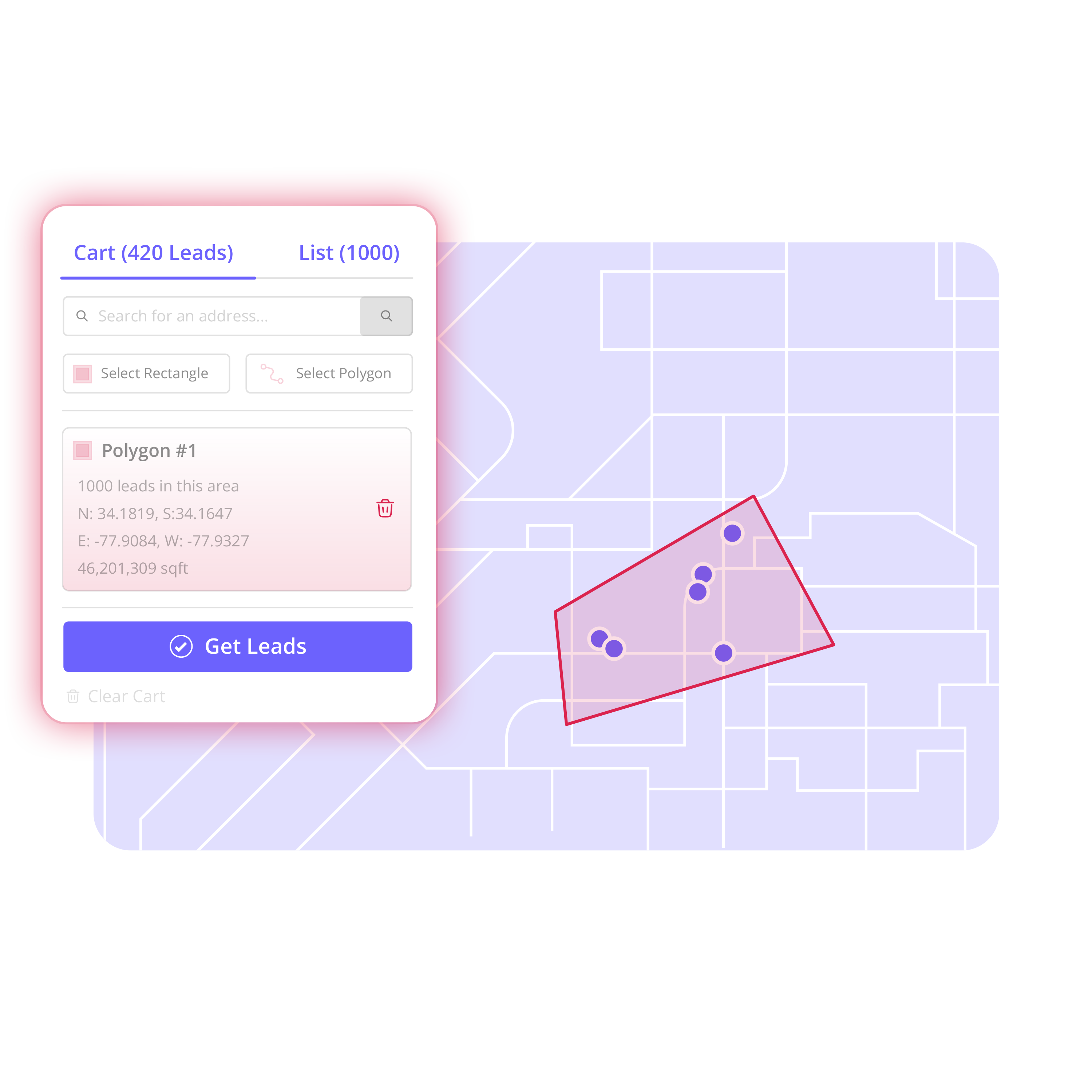
The strongest workflow is simple: choose an area, find the properties, build the contact list, enrich selected records, organize ownership, and export the campaign.
1. Choose the area
Start with a real sales decision. It could be the neighborhood around a completed roof, a subdivision your team wants to enter, or a portion of a city assigned to a new rep. Search the map and draw the exact streets or shape your team intends to work.
A polygon is useful when the neighborhood has irregular boundaries. A rectangle may be enough for a clean grid of streets. The point is not the drawing tool. The point is that the campaign boundary reflects how your team plans to sell.
2. Find and select the properties
Once the area is defined, review the available property records within it. Map layers and clustering can help a manager understand the density of the opportunity before selecting records. Existing-contact overlays can also help teams avoid rebuilding a campaign from properties already in their database.
Select the records that belong in the effort. This is where field judgment matters. A smaller, clearly defined area can be more practical than a large list that nobody has time to work.
3. Create an Audience
Turn the selected properties into an organized Audience. Give it a name that tells the team what it is and why it exists, such as “Oak Ridge - March Roof Completion” or “Northside Storm Area - Rep Team A.”
That name sounds basic, but it reduces confusion later. Good campaign names help managers distinguish active neighborhoods, past exports, and areas that should not be assigned twice.
4. Enrich selected records
Contact enrichment should happen after selection, not before. Build the territory first. Enrich what matters.
Available homeowner or property-owner contact information can make a selected campaign easier to work across calls, direct mail preparation, and other approved outreach channels. But not every property needs the same level of research. Selective enrichment helps teams focus effort and spend on records they actually intend to pursue.
Contact availability is not consent to contact. Teams should use contact data in line with applicable laws, channel requirements, company policy, and any suppression or do-not-contact processes they maintain.
5. Organize ownership and activity
A list is only useful if people know what to do with it. Assign prospects, set statuses, add notes, and track relevant activity so the field team and office are working from the same campaign context.
For a small roofing team, that may mean assigning a group of streets to each rep. For a larger operation, it may mean separating canvassing, calling, and follow-up responsibilities. Lightweight CRM tools are valuable here because they keep the territory, records, and ownership connected without turning campaign setup into a major systems project.
6. Export when the campaign is ready
Once the Audience is organized, export the records into the sales or outreach tools your team already uses. The export should be the end of preparation, not the beginning of cleanup.
Territory follows this map-to-prospect-list workflow: search the map, draw an area, select leads, create an Audience, enrich, organize, and export. It is built for teams that need to move from “we want to sell here” to “here is the organized prospect list we are going to work.”
How to Use Lead Lists Without Letting Them Run the Campaign
Lead lists still have a place. An imported customer file can show existing contacts on the map. A third-party list may support a broad direct-mail effort. A past campaign export can help a manager identify records that need follow-up or exclusion.
The better operating model is to treat lists as inputs, not territory strategy. Bring in records you already have, view them against the area, and use the map to decide what is active now. This helps prevent the common pattern of handing reps large files with unclear boundaries and hoping they sort it out in the field.
For example, an HVAC company expanding into two adjacent communities may already have a large homeowner list. Instead of dividing the file by rough ZIP code, the manager can draw the actual neighborhoods, identify existing contacts, build separate Audiences, and assign each one deliberately.
The Decision Comes Down to Control
Use a prebuilt lead list when the audience is already defined, broad coverage is the goal, and geography is secondary. Use property data when the area itself is the strategy.
For most neighborhood-based roofing campaigns, geography is not secondary. The streets around a completed job, the blocks affected by a storm, and the communities assigned to a sales rep are the campaign. Starting with property data keeps the list connected to that reality.
Your next campaign does not need to begin with another oversized spreadsheet. Start with the place your team can work well, define it clearly, and turn that territory into an organized prospecting campaign.