TERRITORY FOR RESIDENTIAL SOLAR SALES

Give Your Solar Team a Neighborhood Before They Start Knocking.

Pick the streets, review available properties, and build an Audience your setters and sales managers can organize. Territory gives geographically driven solar teams a clearer starting point—without replacing their canvassing CRM.

See the map workflow and available properties before deciding which contacts to add. Contact availability varies.

Set the territory before the first knock.

The problem Territory solves

A Sales Team Shouldn’t Have to Invent Its Territory in the Field.

When areas are assigned vaguely, reps spend time deciding which streets belong to them, managers work from disconnected address files, and follow-up gets hard to coordinate. Put the geography and the prospect records together before the field work begins.

Without a defined campaign

  • A manager texts an approximate area to several reps
  • Properties are gathered and copied between spreadsheets
  • Assigned contacts and follow-up status live in separate places

With Territory

  • One defined neighborhood. One saved Audience. Clear contact ownership.
Before Territory
Neighborhood without a clear campaign boundary

Vague directions and scattered address files make ownership and follow-up hard to coordinate.

With Territory
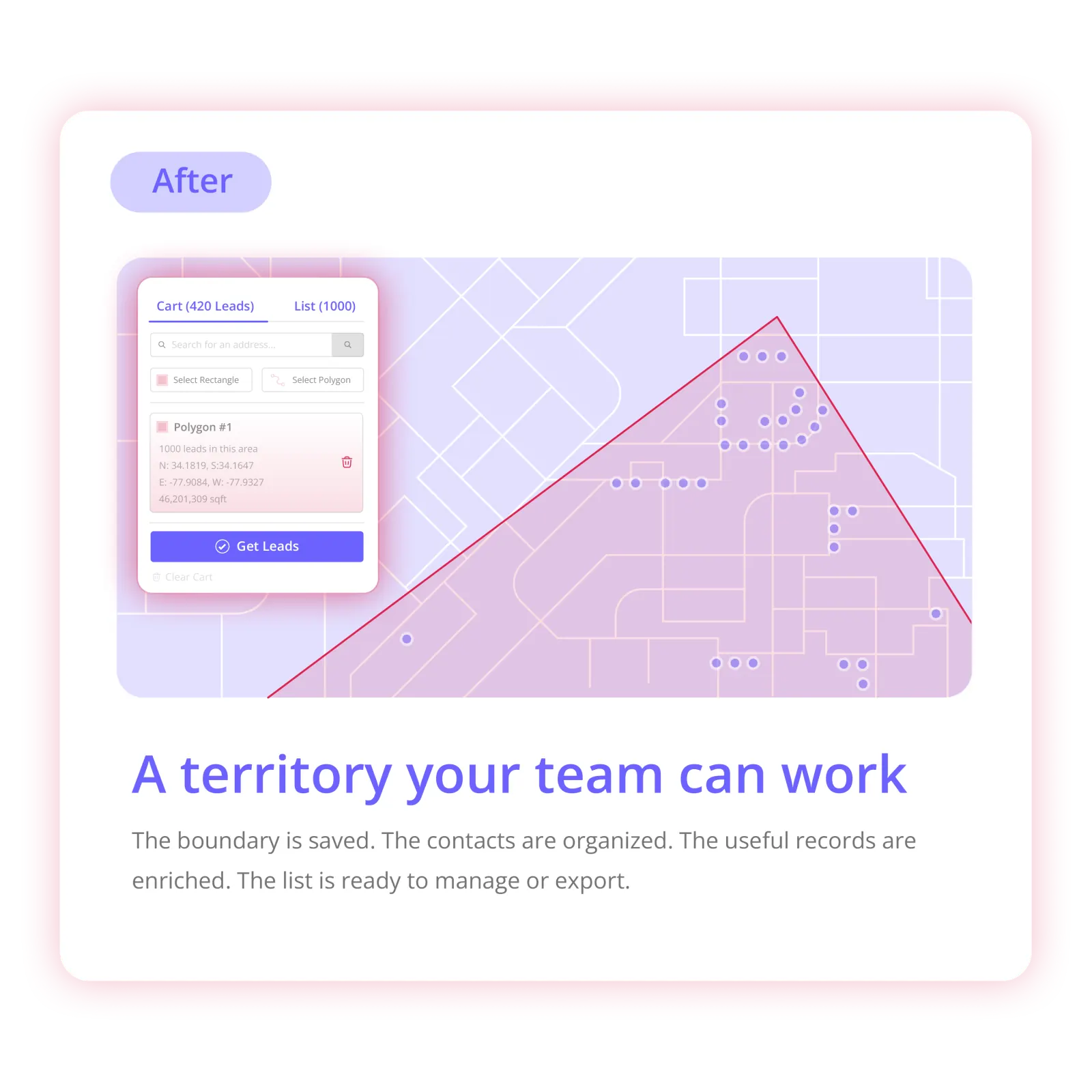
Defined map area turned into a Territory Audience

One defined neighborhood. One saved Audience. Clear contact ownership.

See how the workflow works ↓

Product demo

Watch a Solar Territory Become a Workable Prospect List.

Show the exact workflow—not a promise of booked appointments or verified solar suitability.

  1. 1. Search a subdivision or chosen service area Search a subdivision or chosen service area
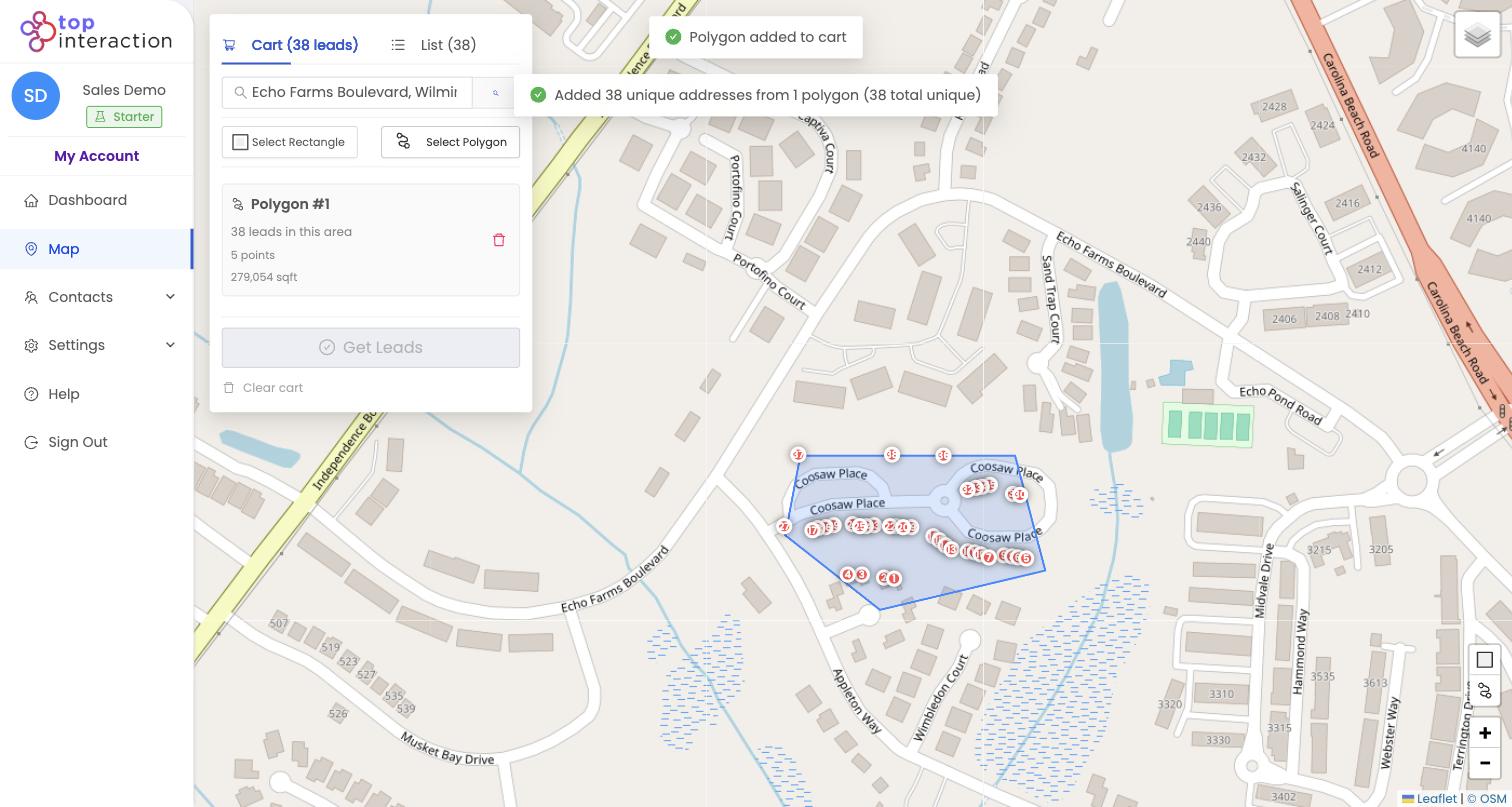
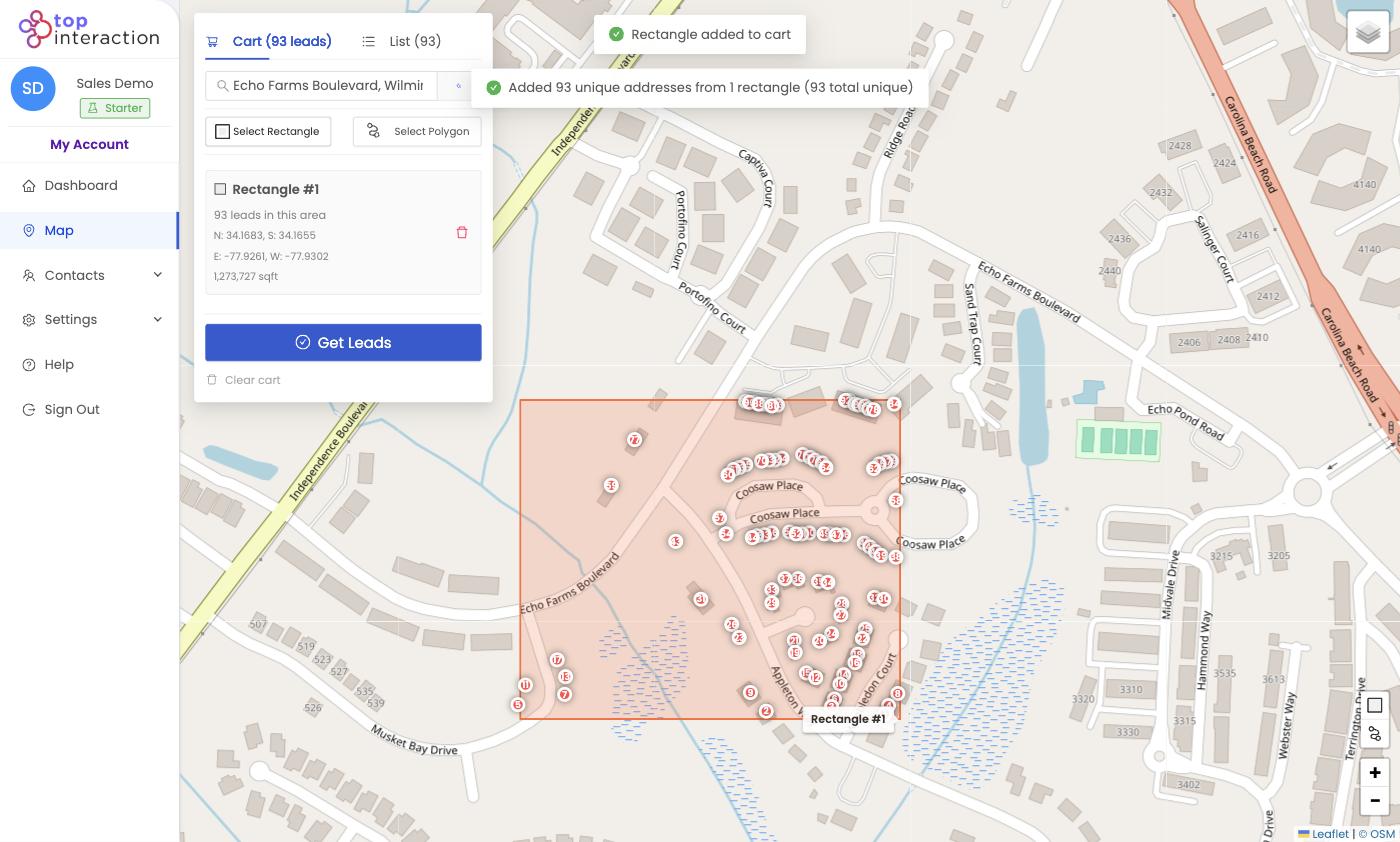
  2. 2. Draw a polygon around the streets the team intends to cover Draw a polygon around the streets the team intends to cover
  3. 3. Review available properties and select the records to include Review available properties and select the records to include
  4. 4. Create an Audience and enrich only the selected contacts that need it Create an Audience and enrich only the selected contacts that need it
  5. 5. Assign records, update statuses, or export CSV for the existing sales workflow Assign records, update statuses, or export CSV for the existing sales workflow
Outcomes

What Solar Sales Teams Get From the Map-First Workflow

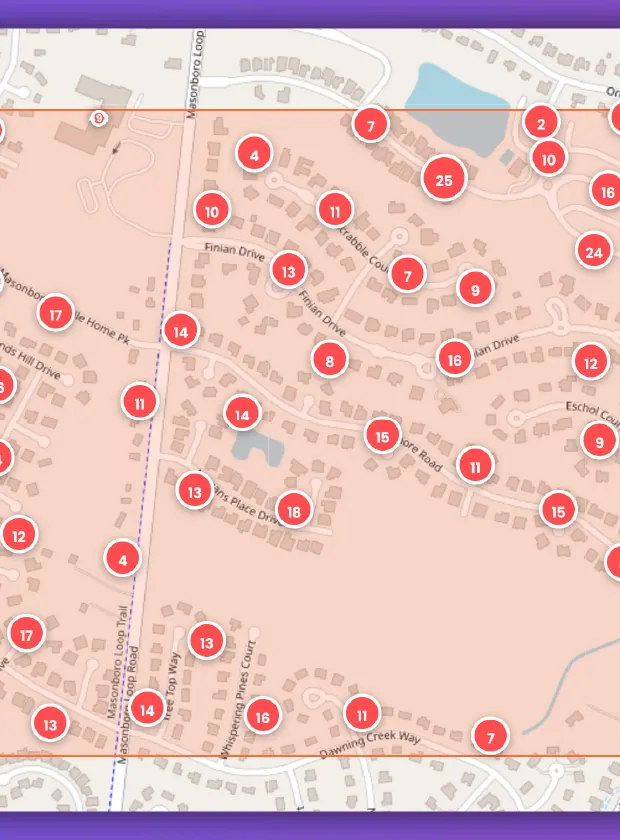
Map selection with a drawn territory polygon
Outcome 1

Choose the streets intentionally

Select the neighborhood your team already wants to prospect rather than starting from a broad purchased list.

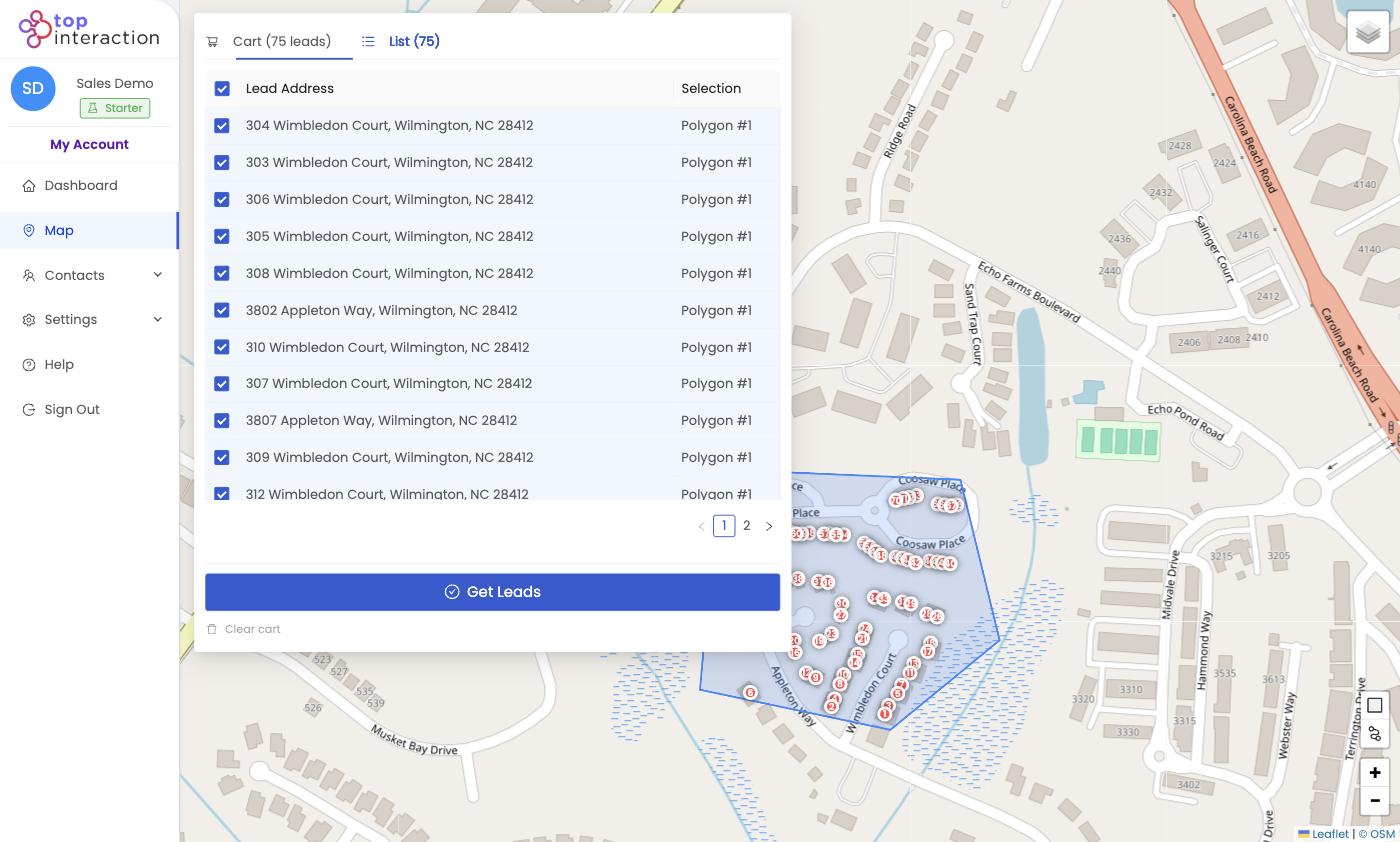
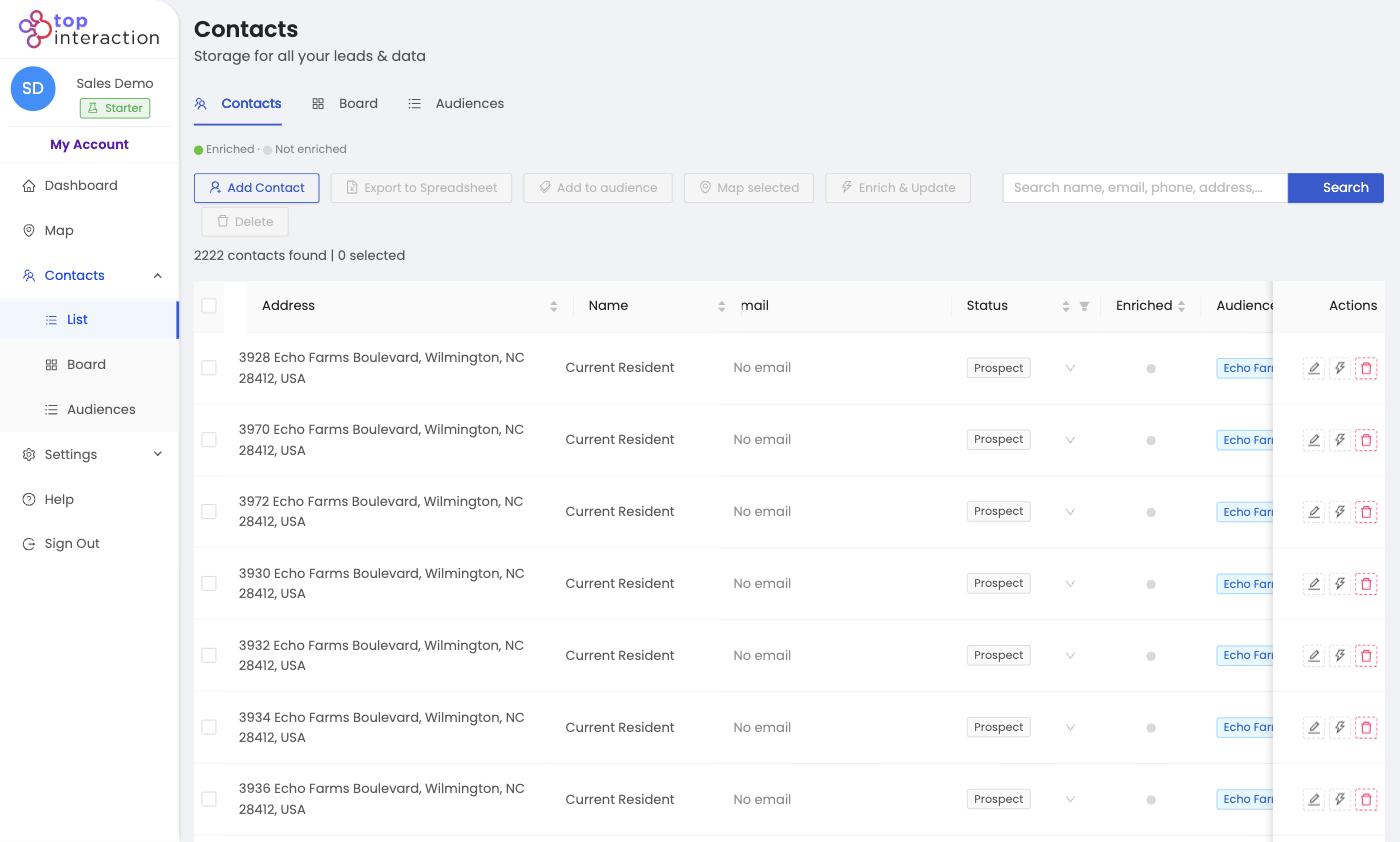
Audience list with selected property contacts
Outcome 2

Give setters a defined starting list

Create a saved Audience so your team knows which properties belong to the campaign.

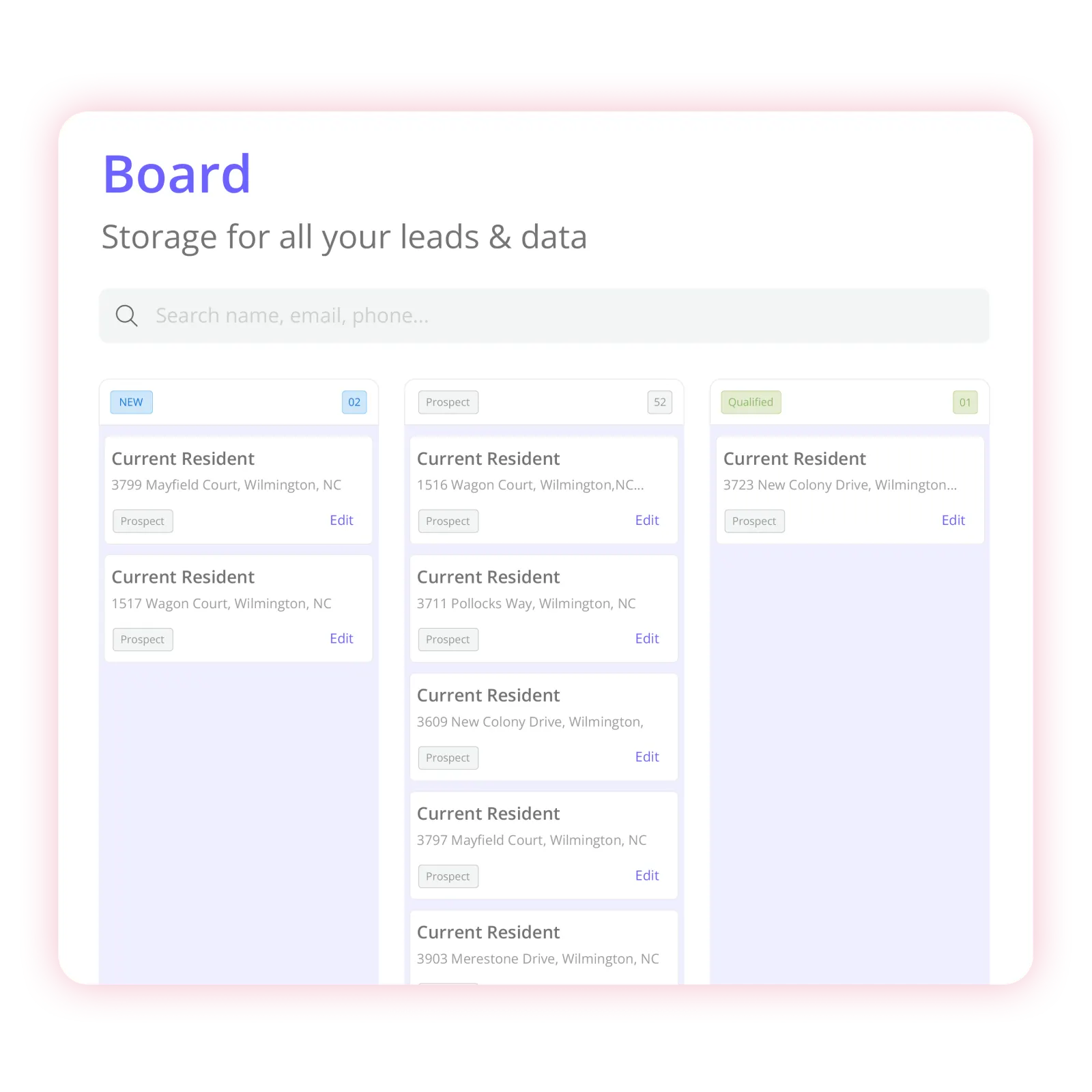
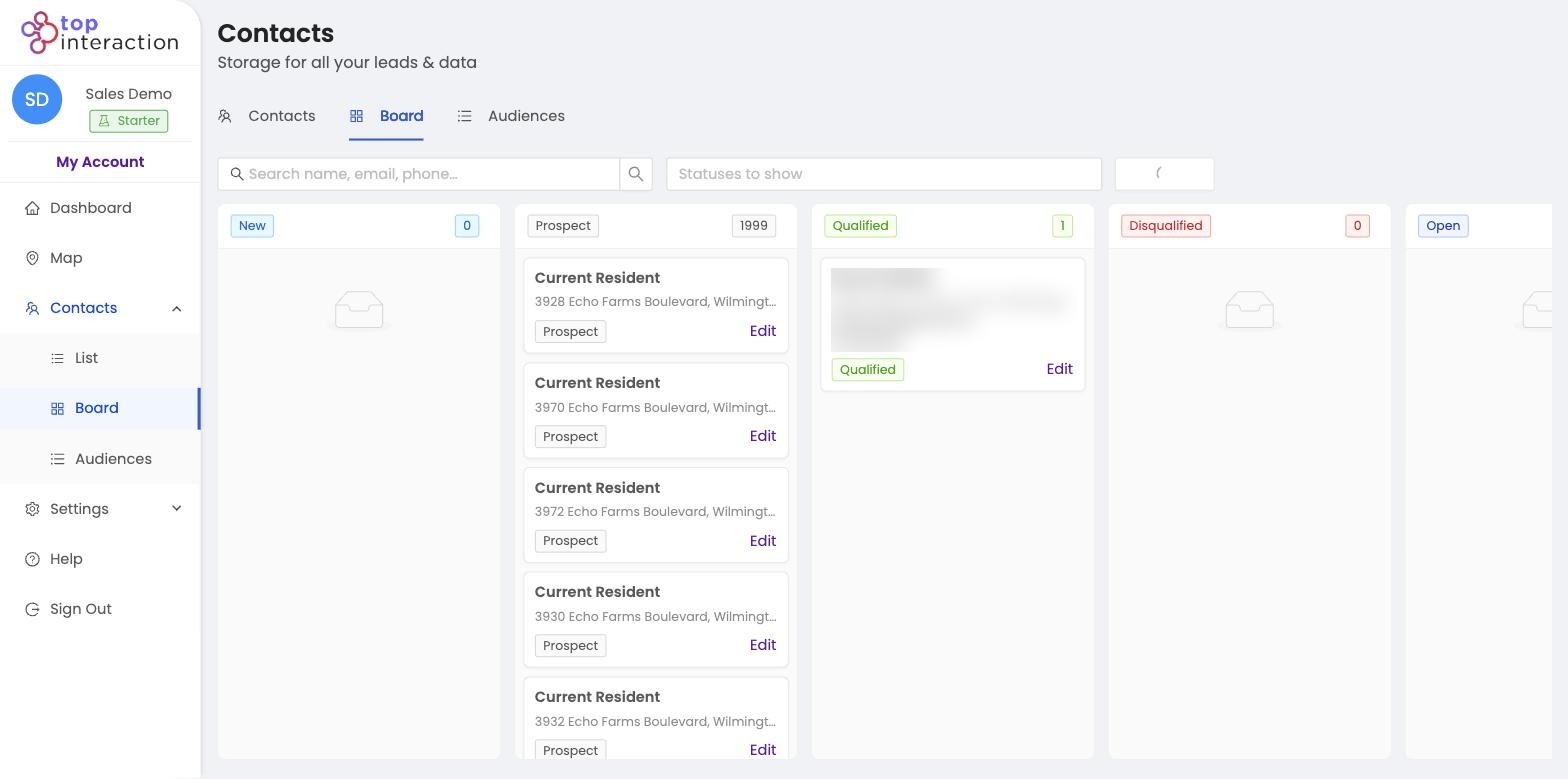
Board View organizing assigned contacts
Outcome 3

Make handoffs less scattered

Assign contact ownership, record notes, use Board statuses, and export the records to the tool your team actually uses.

How it works

Choose the Area. Build the Audience. Use the List.

Map → Select properties → Audience → Enrich → Organize / Assign → CSV export

  1. 1. Search a subdivision or chosen service area
  2. 2. Draw a polygon around the streets the team intends to cover
  3. 3. Review available properties and select the records to include
  4. 4. Create an Audience and enrich only the selected contacts that need it
  5. 5. Assign records, update statuses, or export CSV for the existing sales workflow
Campaign situations

Built Around the Campaigns You Already Have in Mind

New subdivision push
Use case

New subdivision push

Select the surrounding residential area and organize its available property records into one Audience.

Several canvassing teams
Use case

Several canvassing teams

Build separate Audiences for assigned areas and make ownership visible; overlapping polygons still require manual coordination today.

Follow-up after field prospecting
Use case

Follow-up after field prospecting

Use statuses, notes, and CSV export to keep selected prospects organized after the initial visit.

Why Territory

Not Another Full Solar CRM. The Geographic List-Building Step Before It.

Territory helps plan the where and prepare the who. Keep your dialer, canvassing execution platform, proposals, and setter/closer pipeline where they already run.

Territory is a fit when

a customer wants to define specific geographic areas, select available property records, build organized Audiences, selectively enrich, assign contacts, and export to tools they already use.

Product boundary: Territory does not certify roof condition, sun exposure, utility economics, solar suitability, or homeowner readiness to buy. It does not replace live rep GPS tracking.

Pricing

Start With a Territory That Fits Your Team.

Pro is a practical starting plan for a three-person group; Team may fit five-person teams. Pick based on real monthly enrichment use, not a generic lead-count claim. Switch to yearly billing and save 17%.

Build a Campaign →

Starter

Perfect for getting your first neighborhoods organized and exported—fast.

$55 per month · $660/yr
Seats
2
2 included
Sign up

Includes

  • 2 seats included
  • 25,000 active contacts
  • 150 Enrich Credits/mo (1,800/yr billed annually)
  • 30,000 exports/mo
  • Nationwide coverage
  • Contact Audiences
  • Contact enrichment
  • List & Board views
  • Team contact assignment
  • CSV export (unlimited re-exports)
  • Unlimited map previews*
  • Unlimited saved territories*

Team

Built for real operations—multiple reps, shared lists, and repeatable campaigns.

$179 per month · $2,148/yr
Seats
10
10 included
Get started now

Includes

  • 10 seats included
  • 150,000 active contacts
  • 500 Enrich Credits/mo (6,000/yr billed annually)
  • 125,000 exports/mo
  • Everything in Pro
  • Highest Enrich, contacts, and export limits
  • Largest included seat count

Enterprise

For organizations that need custom volume, security, and rollout support.

Custom tailored to your team
Build a Campaign

Everything in Team, plus

  • Custom seats and data volume
  • Dedicated onboarding
  • Security & procurement review
  • Named support contact
  • Flexible billing
  • Roadmap input for field workflows
  • Roofing
  • Solar
  • HVAC
  • Home services
  • Multi-crew sales

Compare plans & features

Feature Starter $55/mo Pro $110/mo Popular Team $179/mo
Limits
Seats included 2 5 10
Additional seat / month $15 $13 $10
Enrich Credits / mo 150 300 500
Active contacts 25,000 75,000 150,000
Exports / mo 30,000 55,000 125,000
Coverage & maps
Geographic coverage Nationwide Nationwide Nationwide
Map radius Plan-dependent Plan-dependent Plan-dependent
Map previews Unlimited* Unlimited* Unlimited*
Saved territories Unlimited* Unlimited* Unlimited*
Workflow
Contact Audiences Included Included Included
Contact enrichment Included Included Included
List & Board views Included Included Included
Team contact assignment Included Included Included
CSV export Included Included Included
CSV re-exports Unlimited Unlimited Unlimited

*Unlimited map previews and saved territories are subject to reasonable technical and usage safeguards.

Need more than Team? Build a Campaign →

Product proof

See the Workflow. Judge the Data. Build Your Own Campaign.

Territory is not promising booked appointments, guaranteed lead intent, complete contact coverage, or exclusive homeowner data. It gives you control of the area and a concrete process for organizing the available property records.

Choose an area
Build the Audience
Organize
Export
Territory map with a drawn neighborhood area 01

Choose an area.

Search a place you already care about and draw the streets your team wants to work.

Selected properties inside a Territory polygon 02

Build the Audience.

Review available properties, select what belongs in the campaign, and save them together.

Territory Board View organizing campaign contacts 03

Organize the campaign.

Assign ownership, update statuses, and track progress in List or Board View.

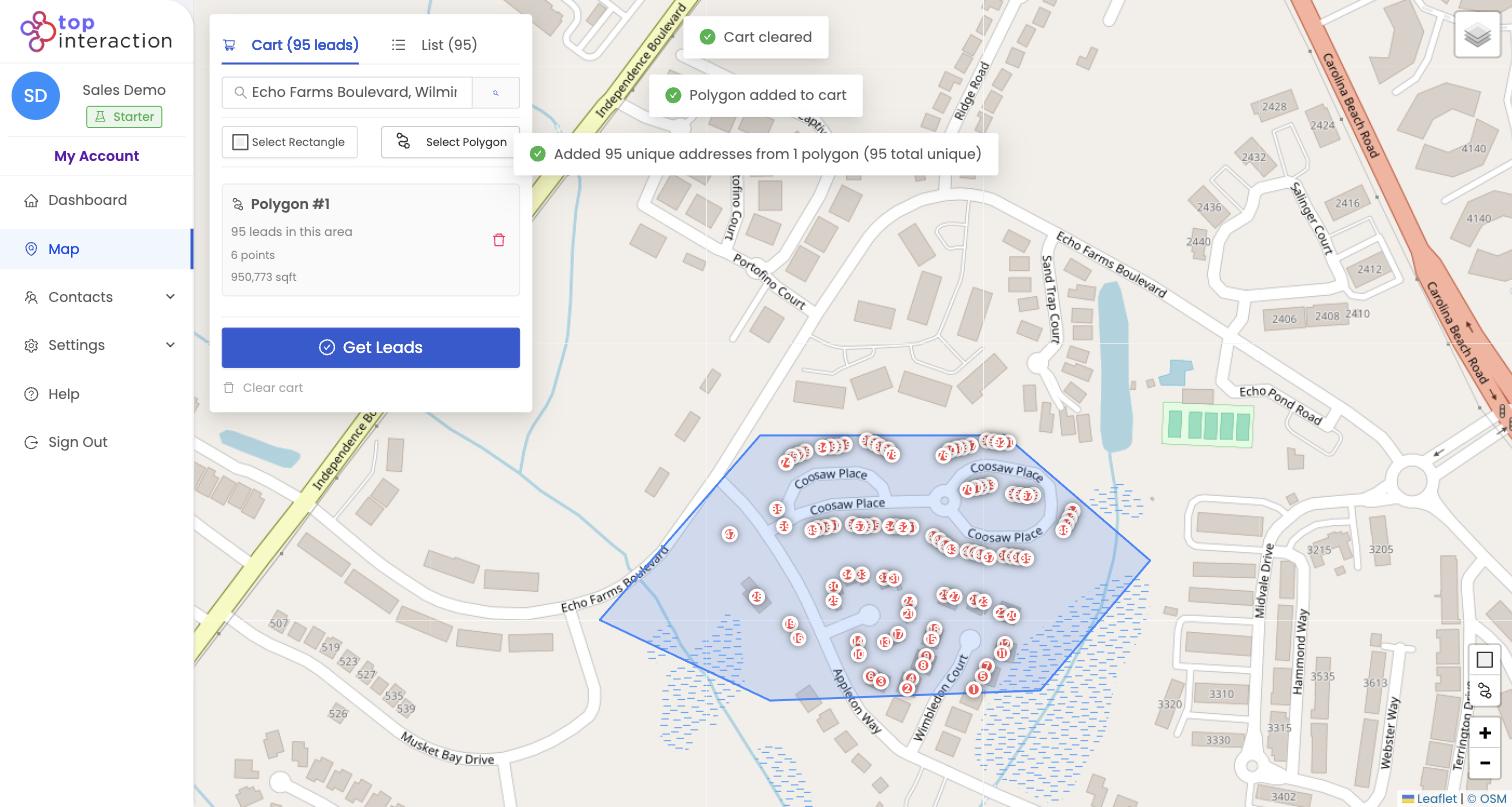
Territory contact list ready for CSV export 04

Export when needed.

Export selected contacts to CSV for the tools your team already uses.

Product boundary: Territory does not certify roof condition, sun exposure, utility economics, solar suitability, or homeowner readiness to buy. It does not replace live rep GPS tracking.

FAQ

Questions Before You Build Your First Territory

Still want to see it with your own market?

Build Your Solar TerritoryStart Free

Can Territory tell which roofs are good for solar?

No. It provides map-driven available property records and contact organization, not verified solar suitability or energy-savings predictions.

Can I give different canvassers different neighborhoods?

You can save separate geographic Audiences and assign contacts. Automatic route optimization and automatic overlap warnings are not confirmed live features.

Can I send these lists to our canvassing platform?

Territory supports CSV export. A native connection to any named field-sales platform should not be assumed.

Does it guarantee homeowners are interested in solar?

No. Available property/contact data does not establish interest, consent, appointment status, or eligibility.

Can I choose streets instead of an entire ZIP code?

Yes. Territory supports rectangle and polygon selection on a map, with available properties shown for the chosen area.

Do all properties include a phone number or email?

No. Property address data and enrichment coverage differ. Additional owner or resident contact details are available only where the underlying data provides them.

Does Territory send the outreach for me?

Territory organizes prospects and supports CSV export. It does not currently promise native email sequences, direct mail fulfillment, dialers, or in-field route optimization.

Territory map ready for your next neighborhood campaign

Your Next Solar Campaign Starts With a Defined Area.

Choose the neighborhood. Build the Audience. Give the team a clear prospecting starting point.

Build Your Solar TerritoryStart Free

Choose the area. Build the list.

Build Your Solar TerritoryStart Free