

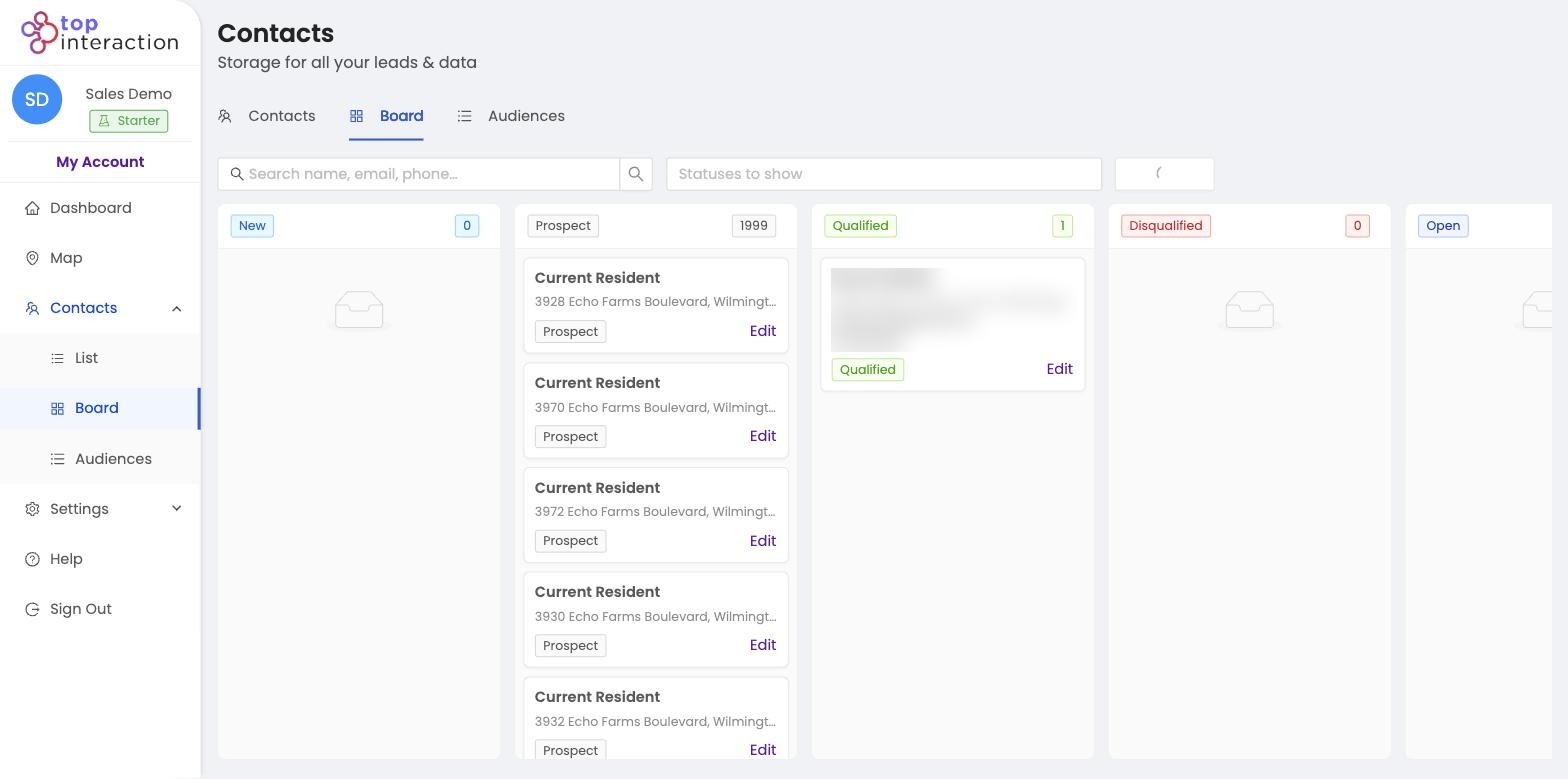
You move prospects through board stages by opening Board View and dragging each contact from one status column to the next—such as New, Contacted, and Qualified—so follow-up stays visible.
Sales pipeline stages and prospect statuses keep territory follow-up honest: everyone sees who has been worked. Kanban prospecting turns status updates into a shared board instead of verbal handoffs. Pair it with lists from map-based prospecting so each stage still maps back to a real geographic audience.
How to do it
- Go to Contacts → Board.
- Find a contact card in its current column (e.g. Prospect).
- Drag the card into the next stage column, or click Edit on the card and change its status.
- Use the Statuses to show filter to focus on the stages you’re working.
- Watch the per-column counts update — that’s your live pipeline snapshot.
See it in action
FAQ
What stages are available?
New, Prospect, Qualified, Disqualified, and Open by default — a natural door-to-door progression.
Does moving a card change it in List View too?
Yes — status is one value per contact, so it’s consistent across Board, List, and audiences.
Can reps update stages from the field?
Yes — the Board works in the browser, so reps can update a contact’s stage as they finish a door.
