

You enrich a contact by selecting the record or list in Contacts, running Enrich & Update, and appending available owner, phone, email, or property details where a reliable match exists.
Homeowner enrichment and contact lookup fill gaps after the list is pulled. Enriched data varies by property, and Enrich Credits are used when you run the update—so enrich the segment you are about to work, not every unused address. Start from a list built with build homeowner contact lists from a map.
How to do it
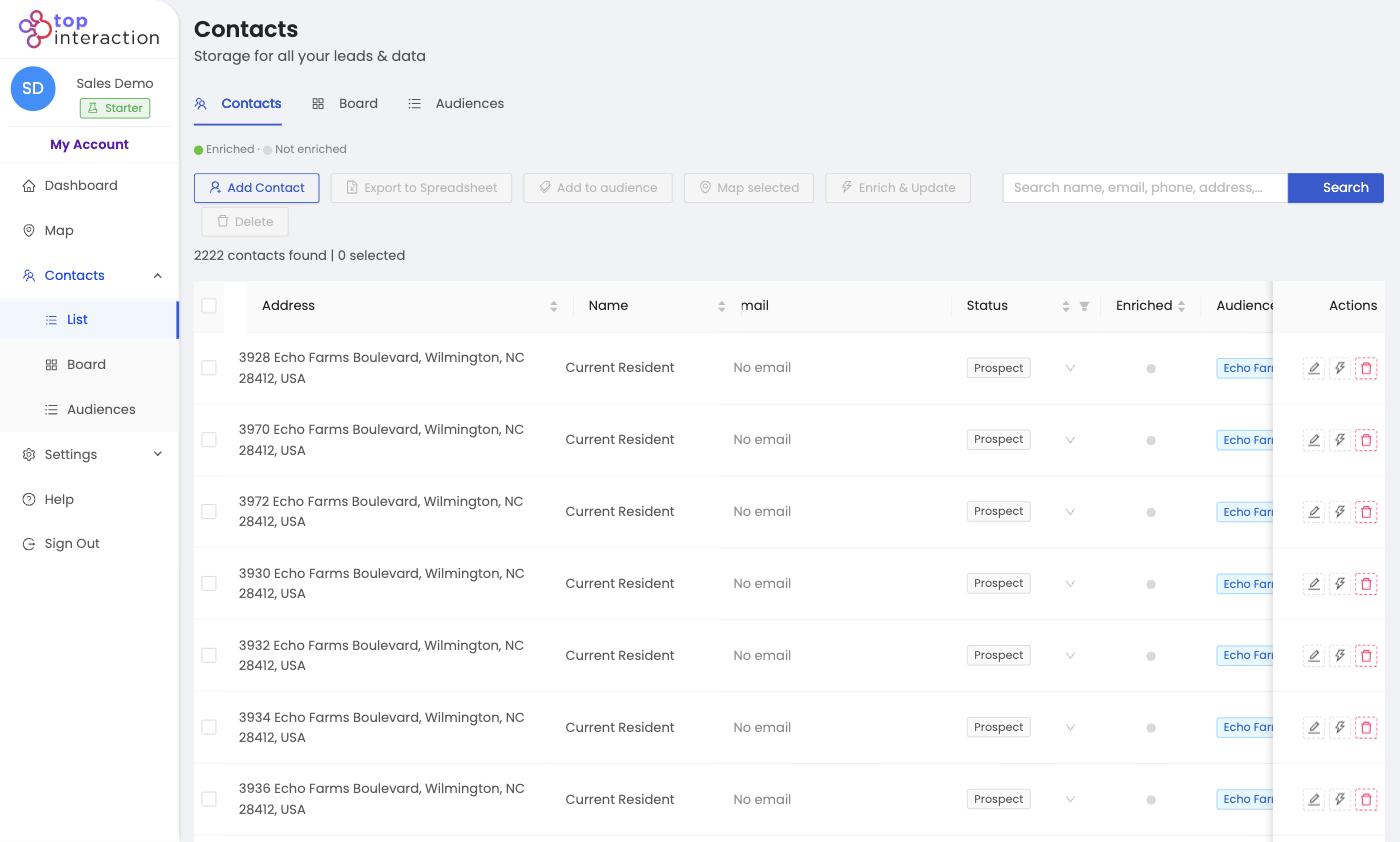
- Go to Contacts → List (or open a saved Audience).
- Tick the checkbox on the contacts you want to enrich, or select the whole list.
- Click Enrich & Update in the toolbar.
- Territory appends available fields; the Enriched indicator turns on for each updated contact.
- Review the new details, then use them for mailers, calls, or scripts.
See it in action
FAQ
What’s the difference between enrichment and pulling a list?
Pulling gives you addresses. Enrichment adds the who and how — names and contact details — to those addresses.
Can I enrich just part of a list?
Yes — select only the rows you want, so you spend enrich credits where they matter.
Does every contact get the same fields?
No — enrichment fills what’s available for each record, so some contacts will have more detail than others.
